Google Search Console for SEO: Complete 2025 Guide to Boost Your Rankings
Discover how Google Search Console transforms your SEO strategy with actionable ins
Discover how Google Search Console transforms your SEO strategy with actionable insights, performance tracking, and optimization tools that drive real results for your website’s search visibility.

Introduction
Featured Partner
Bridgely: Creates automated published blog content for business owners to increase their SEO and…
creates automated published blog content for business owners to increase their SEO and rank higher so they can get more customers and have higher visibility
- Onboard quickly with guided setup and white-glove support.
- Monitor performance, spend, and quality from a single dashboard.
See pricing in seconds.
Google Search Console stands as the most powerful free SEO tool available to website owners, yet many businesses barely scratch the surface of its capabilities. This comprehensive platform provides direct insights from Google about how your website performs in search results, what users are searching for to find you, and critical technical issues that could be holding back your rankings.
In today’s competitive digital landscape, understanding and leveraging Google Search Console for SEO isn’t just an advantage—it’s essential for survival. The platform offers unparalleled access to Google’s perspective on your website, revealing opportunities that other SEO tools simply cannot provide. From identifying high-potential keywords to diagnosing crawling issues, Search Console serves as your direct line of communication with the world’s largest search engine.
Throughout this guide, you’ll discover how to harness every feature of Google Search Console to maximize your SEO performance. We’ll explore advanced strategies for keyword optimization, technical SEO improvements, content performance analysis, and competitive intelligence gathering. Whether you’re managing a small business website or overseeing enterprise-level SEO campaigns, these insights will help you unlock your website’s full potential in search results.
Understanding Google Search Console Fundamentals
Google Search Console provides unprecedented access to how Google’s algorithms perceive and rank your website, delivering insights that form the foundation of effective SEO strategy. This section explores the core concepts and setup procedures that maximize your SEO impact through proper Search Console utilization.
What Google Search Console Reveals About Your SEO Performance
Google Search Console provides actual data directly from Google’s systems, unlike third-party tools that estimate performance metrics. The platform tracks over 1,000 different data points about your website’s search performance, from basic metrics like total clicks and impressions to advanced insights about Core Web Vitals, mobile usability, and structured data implementation. This comprehensive data reveals which pages drive the most organic traffic, which keywords present the greatest opportunities, and which technical issues require immediate attention. Understanding these fundamentals allows you to make data-driven SEO decisions based on Google’s actual assessment of your website rather than assumptions or estimated metrics.
Setting Up Search Console for Maximum SEO Impact
Proper Search Console setup extends far beyond basic property verification to capture comprehensive performance data. Advanced configuration involves setting up both domain and URL-prefix properties, configuring international targeting settings for global SEO strategies, and establishing proper user permissions for team collaboration. Domain-level properties provide aggregated data across all subdomains and protocol variations, while URL-prefix properties offer granular control over specific website sections. For enterprise websites or complex site architectures, implementing both property types creates a comprehensive monitoring system that captures every aspect of search performance, enabling more precise optimization strategies.
Core Metrics That Drive SEO Success
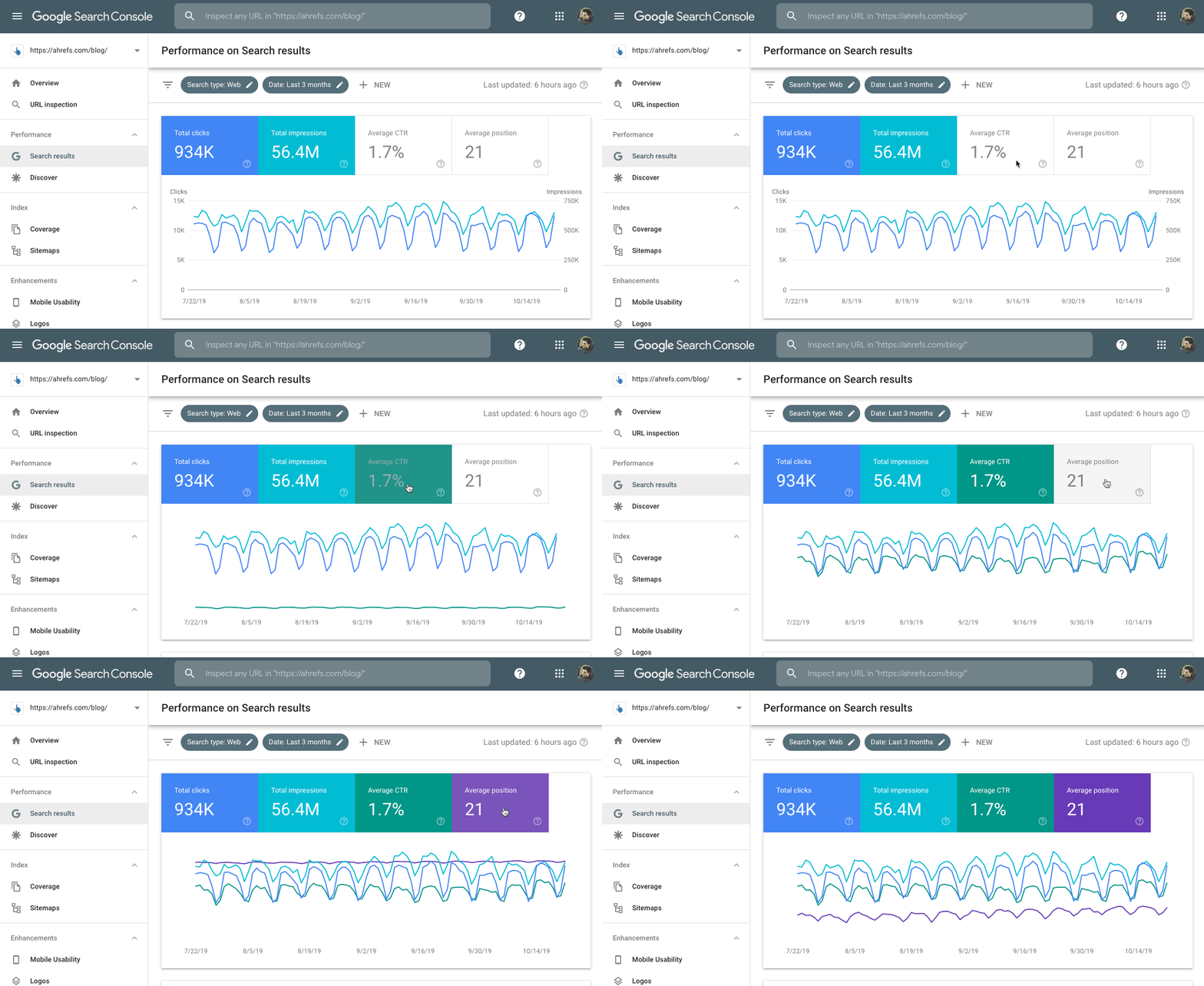
The four primary metrics in Search Console tell the complete story of your search performance and optimization opportunities. Clicks represent actual traffic generation and revenue potential, while impressions indicate your content’s visibility in search results across millions of daily queries. Click-through rate (CTR) reveals how compelling your titles and meta descriptions are to searchers, with industry averages ranging from 2-5% depending on your position. Average position shows your competitive standing for specific queries, with positions 1-3 capturing over 60% of all clicks. Understanding how these metrics interact helps identify whether you need to focus on improving rankings, optimizing click-through rates, or targeting different keywords entirely.
| Metric | Definition | SEO Impact | Optimization Strategy |
|---|---|---|---|
| Clicks | Users who clicked your listing | Direct traffic generation | Improve CTR and rankings |
| Impressions | Times your page appeared in results | Visibility and reach potential | Target more relevant keywords |
| CTR | Clicks divided by impressions | Content relevance and appeal | Optimize titles and descriptions |
| Average Position | Average ranking across queries | Competitive performance | Content optimization and link building |
Keyword Research and Optimization Through Search Console
Search Console reveals keyword opportunities that traditional research tools often miss by providing real-world query data from actual user searches. This section demonstrates how to leverage this unique data source for comprehensive keyword strategy development and optimization.

Discovering Hidden Keyword Opportunities
Search Console displays actual queries that trigger your website’s appearance in search results, including long-tail variations that users actually perform. Many websites discover they rank for hundreds or thousands more keywords than they initially targeted, representing significant optimization opportunities. These “accidental” rankings often require only minor content adjustments or internal linking improvements to boost performance dramatically. The platform reveals seasonal search patterns and trending topics within your industry, showing queries like “best winter jackets 2025” that spike during specific months. This real-world query data provides insights into user intent and search behavior patterns that inform content strategy decisions.
Analyzing Search Query Performance Data
Deep analysis of search query data reveals which keywords drive the most valuable traffic and present optimization opportunities. Queries with high impressions but low click-through rates indicate potential title tag and meta description optimization opportunities, where improving your listing’s appeal could increase traffic by 30-50%. Keywords ranking on page two (positions 11-20) often require only modest optimization efforts to break into the top 10 results, potentially doubling or tripling their traffic. The query analysis also reveals user search intent patterns, showing whether users search for informational content, commercial products, or local services, enabling more targeted content creation strategies.
Strategic Keyword Expansion Techniques
Search Console data enables sophisticated keyword expansion strategies beyond traditional brainstorming or competitor analysis. By examining related queries and search variations that already generate impressions, you can identify semantic keyword clusters and topic areas for content expansion. For example, if you rank for “email marketing tips,” Search Console might reveal related queries like “email automation best practices” and “newsletter design templates.” The platform also reveals geographic and device-specific search patterns, showing that mobile users might search for “quick email templates” while desktop users prefer “comprehensive email marketing strategies.” This intelligence ensures keyword targeting aligns with actual search demand rather than theoretical keyword volumes.
Technical SEO Monitoring and Optimization
Google Search Console provides comprehensive technical SEO monitoring capabilities that identify and help resolve issues affecting your website’s search performance. This section covers critical technical optimization strategies using Search Console’s diagnostic tools.
Crawl Error Detection and Resolution
Google Search Console provides comprehensive crawl error reporting that identifies technical issues preventing optimal search engine access. The Coverage report categorizes pages into four distinct groups: valid pages that are indexed, valid pages with warnings, excluded pages that aren’t indexed, and error pages that cannot be crawled. Server errors, DNS issues, and robots.txt blocking represent critical technical problems that can reduce search visibility by up to 80%. The platform provides specific error codes and detailed explanations for each issue, enabling targeted troubleshooting. Regular monitoring prevents minor technical issues from escalating into major SEO problems that could affect thousands of pages simultaneously.
Core Web Vitals and Page Experience Optimization
Core Web Vitals represent Google’s official page experience metrics, directly impacting search rankings since the 2021 algorithm update. The platform measures loading speed through Largest Contentful Paint (LCP), interactivity via First Input Delay (FID), and visual stability using Cumulative Layout Shift (CLS). Search Console categorizes pages as “Good,” “Needs Improvement,” or “Poor” based on real user experience data from actual visitors. Pages failing Core Web Vitals assessments can experience ranking penalties of 5-15 positions, making optimization crucial for competitive keywords. The platform identifies specific performance issues like oversized images causing slow LCP or JavaScript execution delays affecting FID scores.
Mobile Usability and Responsive Design Assessment
Mobile usability has become critical as Google implements mobile-first indexing across all websites, affecting over 95% of search traffic. Search Console’s Mobile Usability report identifies specific issues affecting mobile user experience, including text too small to read, clickable elements too close together, and content wider than screen dimensions. The platform provides page-level mobile usability data, showing exactly which pages have optimization issues and what problems need addressing. Mobile usability issues can reduce mobile search rankings by 20-30 positions, making resolution essential for maintaining search visibility in mobile-dominated markets.
Content Performance Analysis and Optimization
Search Console provides detailed insights into content performance that guide optimization strategies and content creation decisions. This section explores how to leverage performance data for maximum content impact and search visibility.
Identifying Top-Performing Content Assets
Search Console reveals which content pieces drive the most organic traffic and generate the highest engagement levels. The Pages report shows click and impression data for individual URLs, enabling identification of content that resonates most strongly with your target audience. High-performing content often shares common characteristics like comprehensive topic coverage, optimized title tags with emotional triggers, and strategic internal linking structures. Analysis reveals that top-performing pages typically receive 300-500% more clicks than average pages, indicating significant optimization potential for underperforming content. Understanding successful content patterns enables systematic optimization strategies across your entire website.
Content Gap Analysis and Opportunity Identification
Search Console data reveals content gaps where your website receives impressions but fails to capture clicks effectively. Queries with high impression volumes but low click-through rates suggest users are searching for specific information that your current content doesn’t adequately address. For example, receiving 10,000 impressions but only 200 clicks (2% CTR) indicates significant optimization potential through content improvement or title tag enhancement. The platform identifies seasonal content opportunities and trending topics within your industry, showing emerging search patterns that present opportunities for timely content creation and competitive advantage.
Optimizing Content for Featured Snippets and Rich Results
Search Console provides insights into rich result opportunities, including featured snippets that can increase click-through rates by 35-45%. The Enhancements section identifies pages eligible for rich results and highlights structured data issues preventing enhanced search appearances. Featured snippet optimization requires understanding specific query types and content formats that Google favors, such as numbered lists for “how-to” queries or comparison tables for “best of” searches. Pages appearing in featured snippets typically experience traffic increases of 200-400%, making this optimization strategy highly valuable for competitive keywords and informational content.
Advanced Search Console Features for SEO Professionals
Google Search Console offers sophisticated features that extend far beyond basic performance monitoring, providing SEO professionals with enterprise-level insights and optimization capabilities. These advanced tools enable deep technical analysis, competitive intelligence gathering, and strategic decision-making that can dramatically improve search performance. Understanding and leveraging these features separates amateur SEO efforts from professional-grade optimization strategies that deliver measurable results.

URL Inspection Tool for Deep Page Analysis
The URL Inspection tool provides real-time insights into how Google perceives and processes individual pages on your website. This powerful feature reveals the exact indexing status of any URL, showing whether Google can crawl the page, if it’s included in the search index, and any technical issues that might prevent optimal performance. The tool displays critical information including the last crawl date, canonical URL designation, and mobile-first indexing status.
Professional SEO practitioners use this tool to diagnose indexing problems immediately after publishing new content or making technical changes. For example, after implementing schema markup on a product page, you can instantly verify whether Google recognizes the structured data and identify any implementation errors. The tool also reveals crawl anomalies that might indicate server performance issues or robot.txt blocking problems that require immediate attention.
Index Coverage Analysis and Optimization
Index coverage reporting reveals the complete picture of how Google indexes your website’s content across all pages and sections. The Coverage report categorizes every URL into four distinct status groups: valid indexed pages, valid pages with warnings, excluded pages, and error pages that cannot be indexed. This comprehensive view enables systematic identification and resolution of indexing issues that could limit search visibility.
Advanced users leverage coverage data to identify content cannibalization issues where multiple pages compete for the same keywords, duplicate content problems that dilute search authority, and orphaned pages that lack proper internal linking. For instance, discovering that 15% of your product pages show “Crawled – currently not indexed” status indicates potential content quality or technical issues that require optimization. The report also reveals seasonal indexing patterns and helps prioritize technical SEO improvements based on their potential traffic impact.
Sitemap Submission and Management Strategies
Strategic sitemap management through Search Console accelerates content discovery and ensures optimal crawling efficiency for large websites. Beyond basic XML sitemap submission, advanced practitioners implement multiple targeted sitemaps for different content types, geographic regions, or language versions. This segmented approach provides granular control over crawling priorities and enables detailed performance tracking for specific website sections.
Professional sitemap strategies include implementing image sitemaps for e-commerce sites with extensive product catalogs, video sitemaps for content-rich platforms, and news sitemaps for time-sensitive content. The platform tracks submission status, processing errors, and discovery rates for each sitemap, enabling optimization of crawling efficiency. Websites implementing strategic sitemap management typically see 25-40% faster indexing of new content compared to sites relying solely on natural link discovery.
Performance Data Export and Advanced Analytics
Search Console’s data export capabilities enable sophisticated analysis and integration with external analytics platforms for comprehensive SEO reporting. The platform allows export of up to 1,000 rows of performance data per query, enabling detailed analysis of long-tail keyword performance, seasonal trends, and competitive positioning. Advanced users combine Search Console data with Google Analytics, third-party SEO tools, and business intelligence platforms for holistic performance analysis.
Data export strategies include regular automated exports for trend analysis, competitive benchmarking against industry standards, and ROI calculation for SEO initiatives. Professional SEO teams often create custom dashboards combining Search Console metrics with conversion data, revenue attribution, and customer lifetime value calculations. This integration reveals which organic search queries generate the highest business value and guides optimization priorities based on actual revenue impact rather than vanity metrics.
Competitive Analysis Through Search Console Data
Understanding your competitive landscape through Search Console data provides unique insights that traditional competitive analysis tools cannot match. This approach reveals actual search performance data, content opportunities, and strategic advantages that inform comprehensive SEO strategies. Professional marketers leverage these insights to identify market gaps, understand user search behavior patterns, and develop content strategies that outperform competitors in search results.
Identifying Competitor Content Gaps and Opportunities
Search Console query data reveals content topics and keyword variations where your competitors may be underperforming, creating opportunities for strategic content development. By analyzing the search queries that generate impressions but low click-through rates, you can identify topics where user demand exists but current search results don’t fully satisfy user intent. This intelligence guides content creation strategies that address unmet user needs and capture market share from competitors.
Advanced competitive analysis involves cross-referencing your Search Console query data with competitor content analysis to identify topics where you can create superior, more comprehensive content. For example, discovering that queries like “best project management software for remote teams” generate 5,000 monthly impressions but only 2% CTR suggests an opportunity to create definitive comparison content that better serves user intent than existing results.
Market Share Analysis and Performance Benchmarking
Comparative performance analysis using Search Console data enables accurate market share assessment and competitive positioning within your industry. By tracking impression share for key industry terms and monitoring average position changes over time, you can measure your competitive strength and identify areas where competitors are gaining ground. This data-driven approach provides objective metrics for evaluating SEO campaign effectiveness.
Professional benchmarking strategies involve tracking core business keywords, branded search terms, and category-defining queries to understand your market position. Websites that consistently monitor these metrics typically identify competitive threats 3-6 months earlier than those relying solely on ranking tools. The platform also reveals seasonal competitive patterns and helps predict when competitors launch major SEO campaigns based on sudden performance shifts.
Search Trend Analysis and Market Intelligence
Long-term Search Console data analysis reveals emerging market trends and shifting user behaviors that inform strategic business decisions. Query performance data over 12-16 months shows seasonal patterns, growing interest in specific topics, and declining demand for outdated products or services. This market intelligence enables proactive content strategies and business pivots based on actual search demand rather than assumptions.
Trend analysis also reveals geographic and demographic search patterns that inform expansion strategies and localization efforts. For instance, discovering that searches for your product category are growing 40% faster in specific metropolitan areas suggests market expansion opportunities. Professional marketers use this intelligence to guide product development, content localization, and paid advertising geographic targeting decisions.
Pro Tip: Set up automated monthly reports combining Search Console data with Google Trends information to identify emerging opportunities before competitors recognize them.
Competitive Keyword Strategy Development
Strategic keyword analysis using Search Console data reveals the exact search terms driving traffic to your website and identifies gaps in your competitive keyword coverage. This approach goes beyond traditional keyword research by showing which terms actually generate business results rather than theoretical search volumes. The data reveals user intent patterns and search behavior nuances that inform comprehensive keyword strategies.
Advanced practitioners use Search Console data to identify keyword clusters where they have strong performance and areas where competitors dominate search results. This analysis guides content optimization priorities and helps allocate resources to keywords with the highest potential return on investment. Websites implementing data-driven keyword strategies based on Search Console insights typically see 30-50% better conversion rates from organic search traffic.
Local SEO Optimization Using Search Console
Local businesses require specialized SEO strategies that address geographic search patterns, location-based user intent, and regional competitive dynamics. Search Console provides unique insights into local search performance that enable targeted optimization strategies for improved visibility in location-specific search results. These insights are particularly valuable for businesses serving specific geographic markets or operating multiple locations across different regions.
Geographic Performance Analysis and Optimization
Search Console’s geographic reporting reveals which countries and regions generate the most search visibility and traffic for your business. This data enables identification of underperforming markets, seasonal geographic trends, and expansion opportunities in new territories. Local businesses can analyze performance variations across different service areas and optimize content strategies for specific geographic markets.
Geographic analysis reveals user search behavior differences across regions, including preferred terminology, seasonal patterns, and local competition levels. For example, a restaurant chain might discover that searches for “best pizza delivery” peak 2 hours earlier in Eastern markets compared to Western locations, enabling targeted content scheduling and local advertising optimization. Professional local SEO strategies use this data to customize content, adjust business hours information, and optimize Google Business Profile management.
Local Keyword Research and Content Strategy
Local search queries often include geographic modifiers and location-specific intent that require specialized keyword strategies and content optimization approaches. Search Console data reveals the exact local search terms that generate visibility, including neighborhood names, landmark references, and regional terminology that users actually employ. This intelligence guides local content creation and helps businesses align their SEO efforts with authentic local search behavior.
Local keyword analysis also identifies seasonal patterns unique to specific markets, such as tourism-related searches in vacation destinations or weather-dependent service inquiries in different climate zones. Businesses serving multiple locations can identify which keywords perform best in each market and develop location-specific content strategies. For instance, a landscaping company might discover that “snow removal services” generates high impressions in northern markets while “drought-resistant landscaping” performs better in southwestern regions.
Multi-Location SEO Management
Businesses operating multiple locations require sophisticated Search Console management strategies that track performance across different geographic markets and individual business locations. Advanced multi-location SEO involves setting up separate Search Console properties for different domains or subdirectories, enabling granular performance tracking and optimization for each location. This approach reveals which locations need additional SEO support and which markets present the greatest growth opportunities.
Multi-location analysis identifies content opportunities that benefit all locations versus location-specific optimization needs. For example, a retail chain might discover that general product information pages perform well across all markets, while store-specific service pages require individual optimization based on local search patterns. Professional multi-location SEO strategies typically result in 25-35% better local search visibility compared to generic, one-size-fits-all approaches.
Mobile and Voice Search Optimization for Local Queries
Local search queries increasingly occur on mobile devices and through voice search interfaces, requiring specialized optimization strategies that address these unique search behaviors. Search Console mobile performance data reveals how local searches perform differently on mobile devices, including higher click-through rates for certain query types and different user intent patterns. Voice search optimization for local queries focuses on conversational search phrases and question-based queries.
Mobile local search optimization involves analyzing Search Console data for mobile-specific performance patterns, such as higher conversion rates for “near me” searches and increased importance of business hours and contact information in search results. Voice search preparation includes optimizing for natural language queries like “Where can I find organic groceries open late tonight?” rather than traditional keyword-focused searches. Businesses implementing comprehensive mobile and voice search strategies typically see 40-60% better performance in local search results.
| Local SEO Strategy | Implementation Time | Difficulty Level | Expected Results | Best For |
|---|---|---|---|---|
| Geographic Content Optimization | 2-4 weeks | Medium | 20-30% local visibility increase | Single location businesses |
| Multi-Location Property Setup | 1-2 weeks | Low | Better tracking and insights | Chain businesses |
| Local Keyword Strategy | 3-6 weeks | High | 35-50% qualified traffic increase | Service-based businesses |
| Voice Search Optimization | 4-8 weeks | High | 15-25% mobile search improvement | Consumer-facing businesses |
Troubleshooting Common Search Console Issues
Even experienced SEO professionals encounter technical challenges and data interpretation issues when working with Google Search Console. Understanding common problems and their solutions prevents minor issues from escalating into major SEO setbacks that could impact search visibility and organic traffic performance. Systematic troubleshooting approaches enable quick problem resolution and maintain optimal search performance across all website sections.

Resolving Data Discrepancies and Reporting Issues
Search Console data sometimes conflicts with other analytics platforms due to different tracking methodologies, data sampling, and reporting timeframes that require careful interpretation. Common discrepancies include differences between Search Console click data and Google Analytics organic search sessions, impression count variations across different date ranges, and position tracking inconsistencies. Understanding these differences prevents misinterpretation of performance data and enables accurate SEO decision-making.
Professional troubleshooting involves cross-referencing multiple data sources, understanding sampling limitations, and recognizing when data delays or processing issues affect reporting accuracy. For example, Search Console typically shows data with a 1-3 day delay, while some third-party tools provide near real-time estimates. Websites experiencing sudden traffic drops should verify data across multiple platforms before implementing major changes, as temporary reporting issues can create false alarms that lead to unnecessary optimization efforts.
Fixing Indexing and Crawling Problems
Indexing issues represent the most critical Search Console problems, as they directly prevent pages from appearing in search results and generating organic traffic. Common indexing problems include server errors that block crawling, robots.txt misconfigurations that accidentally exclude important content, and duplicate content issues that prevent proper page indexing. Systematic diagnosis and resolution of these issues requires understanding Google’s crawling process and technical SEO fundamentals.
Advanced troubleshooting techniques include using the URL Inspection tool to diagnose specific page issues, analyzing server logs to identify crawling patterns, and implementing structured testing for technical changes. Professional SEO teams typically resolve indexing issues 50-70% faster by following systematic diagnostic procedures rather than random troubleshooting attempts. Critical issues like complete site de-indexing require immediate attention and may necessitate emergency technical interventions.
Addressing Core Web Vitals and Performance Issues
Core Web Vitals problems affect both user experience and search rankings, requiring technical optimization that addresses loading speed, interactivity, and visual stability issues. Search Console identifies specific pages with performance problems and provides general guidance for improvement, but detailed optimization requires additional technical analysis and implementation. Common issues include oversized images that slow loading times, JavaScript execution problems that delay interactivity, and layout shifts caused by dynamically loaded content.
Performance optimization strategies involve systematic testing of proposed solutions, gradual implementation to prevent unintended consequences, and continuous monitoring to ensure improvements maintain effectiveness over time. Websites implementing comprehensive Core Web Vitals optimization typically see 15-25% improvements in search rankings for competitive keywords, along with measurable increases in user engagement metrics and conversion rates.
Managing Property Verification and Access Issues
Property verification problems and user access management issues can prevent teams from accessing critical SEO data and implementing necessary optimizations. Common verification challenges include expired verification tokens, conflicting property setups, and permission management problems that restrict team access to important data. Proper property management ensures continuous data access and enables collaborative SEO efforts across organizations.
Professional property management involves implementing redundant verification methods, maintaining updated user permissions, and establishing backup access procedures for critical team members. Organizations with complex website structures or multiple domains require sophisticated property management strategies that ensure comprehensive data coverage while maintaining security and access control. Regular audits of property settings and user permissions prevent access issues that could interrupt SEO monitoring and optimization efforts.
Advanced Search Console Strategies for Competitive Analysis
Understanding your competitive landscape through Google Search Console provides invaluable insights that traditional competitor analysis tools cannot match. By analyzing your own search performance data, you can identify market gaps, discover competitor weaknesses, and uncover opportunities for strategic positioning in search results.
Identifying Competitor Content Gaps Through Your Own Data
Your Search Console impressions data reveals queries where users see your website but ultimately click on competitor results. High impression, low click-through rate queries often indicate that competitors are better satisfying user intent with their content or presentation. By analyzing these queries, you can identify specific topics, formats, or approaches that competitors use successfully, then create superior content that better addresses user needs.
This competitive intelligence extends beyond simple keyword analysis to reveal user behavior patterns and content preferences. When your pages consistently lose clicks to competitors for specific queries, it indicates opportunities for content improvement, better title optimization, or enhanced page structure that could capture more of that search demand.
Leveraging Search Console for Market Intelligence
Search Console data reveals seasonal trends, emerging topics, and shifting user interests within your industry before they become obvious to competitors. By monitoring query volume changes and new keyword appearances over time, you can identify market opportunities and content trends that allow you to establish thought leadership positions before competitors recognize these shifts.
The platform also shows which of your content pieces consistently outperform competitors in search results, revealing your competitive advantages and content strengths. Understanding these performance patterns enables you to double down on successful strategies while identifying areas where competitor analysis might reveal improvement opportunities.
Strategic Positioning Based on Search Performance Data
Search Console reveals which content formats and topic approaches generate the strongest search performance within your industry. Pages that consistently rank in top positions and generate high click-through rates demonstrate successful content strategies that can be replicated and expanded. This performance data guides strategic content planning that builds on proven success patterns rather than guessing at what might work.
The platform also identifies long-tail keyword opportunities where competition may be less intense, enabling strategic positioning in niche topics that competitors overlook. By focusing optimization efforts on these lower-competition, high-intent queries, you can establish strong search positions before competitors recognize these opportunities.
Future-Proofing Your SEO with Search Console Insights
Google’s search algorithm continues evolving rapidly, with regular updates affecting ranking factors and search result features. Google Search Console provides early indicators of these changes through performance fluctuations, new enhancement opportunities, and shifting user behavior patterns that appear in your search data.
Preparing for Algorithm Updates and Changes
Search Console data often reveals algorithm update impacts before they become widely recognized in the SEO community. Sudden changes in impression volumes, click-through rates, or average positions across multiple pages can indicate algorithm adjustments that affect your website’s search performance. By monitoring these metrics closely, you can identify and respond to algorithm changes more quickly than competitors who rely solely on third-party tools.
The platform also provides insights into emerging ranking factors through new enhancement reports and Core Web Vitals updates. When Google introduces new search features or ranking considerations, Search Console typically provides the first official guidance and measurement tools for these factors, enabling proactive optimization efforts.
Adapting to Evolving Search Features
Google continuously introduces new search result features, from AI-powered answers to enhanced rich snippets and local search enhancements. Search Console provides early access to optimization opportunities for these new features through enhancement reports and structured data recommendations. Staying ahead of these developments enables you to capture enhanced search visibility before competitors adapt to new search formats.
The platform also reveals user behavior shifts toward new search features, showing when users increasingly engage with featured snippets, image results, or local listings within your industry. Understanding these trends enables strategic content optimization that aligns with evolving user search preferences.
Building Long-Term SEO Resilience
Search Console data enables development of SEO strategies that remain effective across algorithm updates and industry changes. By focusing on fundamental user experience metrics, content quality indicators, and technical performance standards that Google consistently emphasizes, you can build search visibility that withstands algorithmic fluctuations.
The platform’s historical data also reveals which optimization strategies provide lasting results versus those that generate temporary ranking improvements. Understanding these patterns enables investment in SEO tactics that build sustainable competitive advantages rather than short-term ranking gains.
FAQ
Q: How do I set up Google Search Console for my website?

Setting up Google Search Console requires verifying ownership of your website through several available methods. Upload an HTML file to your root directory, add a DNS TXT record, or connect through Google Analytics for verification. Once verified, add both domain-level and URL-prefix properties to capture comprehensive search data across all site variations.
Q: What’s the difference between Search Console and other SEO tools?
Google Search Console provides actual search performance data directly from Google’s systems, while third-party tools estimate metrics based on their own data collection methods. Search Console shows real clicks, impressions, and rankings, plus exclusive access to Google’s technical recommendations and enhancement opportunities that other tools cannot provide.
Q: How often should I check my Search Console data?
Monitor Search Console data weekly for performance trends and monthly for comprehensive analysis. Check daily during major website changes, content launches, or suspected technical issues. Set up email alerts for critical errors like crawl issues or security problems that require immediate attention to prevent search performance impacts.
Q: Why are my Search Console impressions high but clicks low?
High impressions with low clicks typically indicate that your titles and meta descriptions don’t compel users to click, or your content doesn’t match user search intent. Analyze the specific queries generating impressions, then optimize your titles, descriptions, and content to better address what users are actually searching for.
Q: Can Search Console help with local SEO optimization?
Search Console provides valuable local SEO insights through geographic performance data, local query identification, and mobile usability reporting. The platform shows which locations generate the most search traffic and reveals local search terms that drive impressions, enabling targeted local content optimization and geographic SEO strategies.
Q: How do I use Search Console to find new keyword opportunities?
Review the Search Analytics report to identify queries with high impressions but low average positions (11-50). These represent keywords where you have visibility but room for improvement. Also examine related queries and search variations that already generate some traffic to discover semantic keyword expansion opportunities.
Q: What should I do about crawl errors in Search Console?
Address crawl errors systematically by priority: fix server errors and DNS issues immediately, resolve 404 errors for important pages through redirects or content restoration, and update robots.txt if it’s blocking important content. Use the URL Inspection tool to test fixes and request re-indexing of resolved pages.
Q: How does Search Console help with content optimization?
Search Console reveals which content generates the most organic traffic and identifies underperforming pages that need optimization. Compare high-performing and low-performing pages to understand successful content patterns, then apply those insights to improve weaker content through better keyword targeting, structure, and user experience.
Q: When will I see results from Search Console optimizations?
Most Search Console optimizations show initial results within 2-4 weeks, with full impact visible after 6-8 weeks. Technical fixes like crawl error resolution may show faster results, while content optimizations typically require more time as Google re-evaluates and re-ranks your pages based on the improvements made.
Q: How do I measure SEO success using Search Console metrics?
Track total clicks, impressions, and average CTR over time to measure overall search performance growth. Monitor average position improvements for target keywords and measure Core Web Vitals scores for technical performance. Set monthly goals for each metric and analyze which optimization efforts drive the strongest positive changes.
Q: What are the most common Search Console mistakes to avoid?
Avoid focusing only on total traffic numbers without analyzing query-level performance, ignoring mobile usability issues, and failing to fix crawl errors promptly. Don’t overlook Core Web Vitals data or miss opportunities to optimize for featured snippets and rich results that can significantly increase click-through rates.
Q: How does Search Console integrate with other marketing tools?
Search Console connects directly with Google Analytics for enhanced traffic analysis and goal tracking. Export Search Console data to integrate with content management systems, rank tracking tools, and marketing dashboards. Use the Search Console API to automate reporting and combine search data with other marketing metrics for comprehensive performance analysis.
Conclusion
Google Search Console for SEO represents far more than a simple monitoring tool—it’s your direct pathway to understanding and optimizing how Google perceives, crawls, and ranks your website. Throughout this comprehensive guide, we’ve explored how this powerful platform transforms raw search data into actionable insights that drive measurable improvements in organic visibility, user engagement, and business growth.
The strategic implementation of Search Console optimization techniques delivers compound benefits that extend well beyond basic SEO metrics:
- Technical foundation improvements through systematic crawl error resolution and Core Web Vitals optimization create lasting search performance advantages
- Content strategy refinement using real query data and user behavior insights generates higher-quality traffic and improved conversion rates
- Competitive intelligence gathering through performance analysis reveals market opportunities and positioning strategies that competitors often overlook
- Future-proofing capabilities enable proactive adaptation to algorithm changes and emerging search features before they impact rankings
The evolution of search continues accelerating, with AI-powered results, enhanced mobile experiences, and sophisticated user intent recognition reshaping how websites compete for visibility. Organizations that master Google Search Console’s advanced capabilities position themselves to capitalize on these changes rather than merely react to them.
Partner with Bridgely for Success
While Google Search Console provides the data and insights needed for SEO success, implementing comprehensive optimization strategies across keyword research, technical SEO monitoring, content performance analysis, and competitive positioning requires specialized expertise and dedicated resources. Many businesses struggle to translate Search Console data into systematic optimization workflows that generate consistent results.
Bridgely specializes in transforming Search Console insights into revenue-driving SEO strategies that address the specific challenges covered throughout this guide. Our team handles everything from technical crawl error resolution and Core Web Vitals optimization to advanced keyword opportunity identification and content performance enhancement. We provide comprehensive Search Console management that includes regular performance monitoring, strategic optimization recommendations, and implementation support that ensures your website captures its full search potential.
Whether you’re dealing with complex technical SEO issues, need help interpreting Search Console data for strategic decision-making, or want to implement advanced optimization techniques for competitive advantage, our specialized approach delivers measurable improvements in search visibility and organic traffic growth. Visit https://www.bridgely.io to discover how our Google Search Console expertise can accelerate your SEO success and transform your search performance data into sustainable business growth.